Contribution Guidelines
Installation & Local Development
-
Ensure you have the following software on your system:
- Python 3.12.1+
- Pip 24.0 (Packaged with Python 3.12+)
- Git / GitHub Desktop
- An editor, like Visual Studio Code
-
Clone the
StoryfireMC/Feature-Docsrepo from GitHub:Cloning via SSH (With an SSH Key)
-
Generate an SSH Key, it is NOT recommended to share SSH keys between projects/authentication. Generate one just for the Storyfire Oasis.
Run
ssh-keygen -t rsa -b 4096 -C "your-email@storyfire.com"to generate your key. -
Run
git clone git@github.com:StoryfireMC/Feature-DocsGit will automatically use ~/.ssh/id_rsa - if you want to use a different key, use a command such as:
ssh-agent bash -c 'ssh-add /somewhere/yourkey; git clone git@github.com:StoryfireMC/Feature-Docs'
Cloning via HTTPS (With a GitHub PAT)
- Generate a GitHub Personal Access Token (PAT).
- Run
git clone https://{GITHUB_PAT}@github.com/StoryfireMC/Feature-Docs.
-
-
Open your favourite code editor and add the new cloned folder to your workspace.
- Run
pip install -r requirements.txtto install the required packages. - Run
mkdocs serveto serve your site locally at http://127.0.0.1:8000.
Committing (via PR)
- Verify your changes:
git status - Create a new branch:
git checkout -b branch_nameUse format
your-name/your-featurewhen creating branches - e.g.jack/docs-renting-properties - Commit your changes:
git commit -m "feat: ✨ Did a thing"Use Semantic Commits (See below)
- Push to your new branch:
git push origin branch_name - Create your PR: by visiting the Pull Requests tab of the repository.
- Request a review: from jsJack or LilyLindstrand.
Guide: Semantic Commits
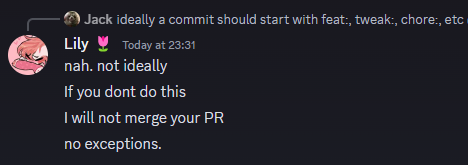
You must use the conventional commit standard to have your pull request merged.
Read more about the conventional commit standard.
You have been warned!
Your commit will not be merged by the Dev Manager: