Vanilla Inventory View
See Custom inventory System for more info. Vanilla Inventories are different depending on the server.
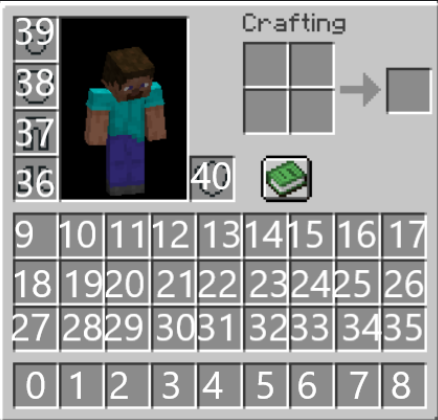
City View
In the City, the Inventory will have the following contents:
- Slot 8: "Main Menu" button to open the Main Menu
- Slot 34: Previous Page Arrow
- Slot 35: Next Page Arrow
- Slot 9: Swap Inventory Views Button, See Armor Vanity Slots for more info
- Slot 18: Play Minigames Button, opens the Minigame GUI.
- Slot 27: TBD, but reserved for a button.
All other unfilled slots (aside from armor&offhand) will be filled with items from the custom list. If not all items can be viewed, the next/previous page buttons can be used to swap between them.
Slots 39, 38, 37, 36 will be using the Armor or Vanity armor, depending on which is currently selected (swapped with slot 9), see Armor Vanity Slots for more info.